


HotPi Pro is here! Simple, powerful, and efficient!
What is HotPi Pro?
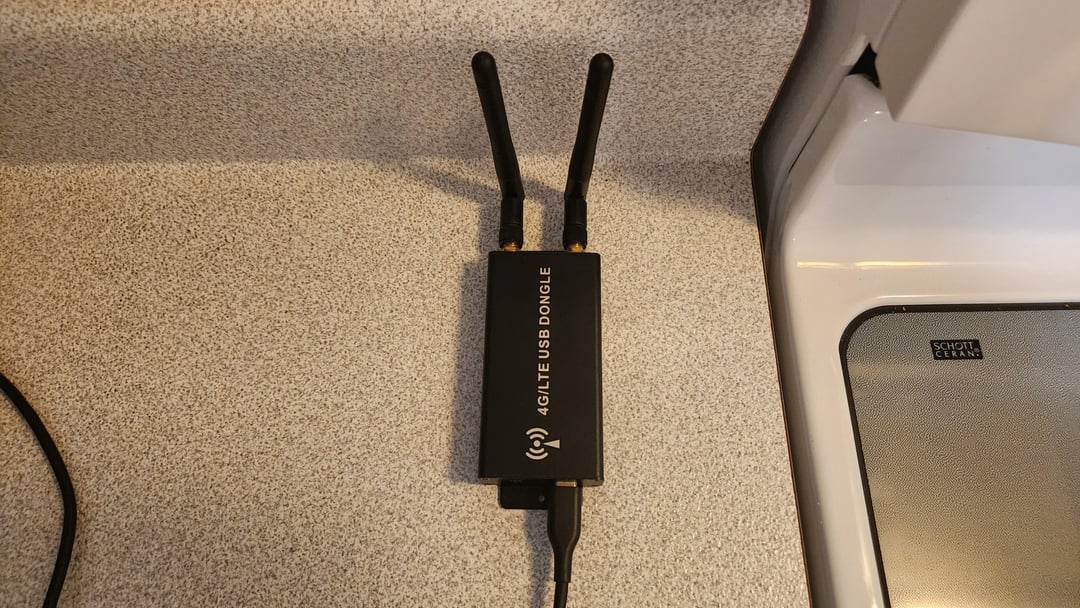
HotPi Pro is the second generation of HotPi, a power efficient mobile hotspot and media server. It allows devices such as smartphones, tablets, PCs, etc, to connect over Wi-Fi and access 4G-LTE cellular internet, as well as media streaming. Simply install and open the VLC app on your favorite device and your movies, music, pictures, etc, are loaded automatically. It's that easy! Where HotPi Pro really shines is in its power consumption. It draws very little power. To power it, all you need is a USB 2.0 port capable of supplying 2 or more amps, which many power banks, stations, can do easily. This makes HotPi Pro ideal for campers, van lifers, or any Raspberry Pi enthusiast! The system features a Raspberry Pi 3B, a Samsung 4TB T7 SSD, and a SIMCom SIM7600G-H 4G-LTE modem inside an external modem enclosure. This enclosure features removeable antennas allowing for the connection of powerful rooftop mounted 4G-LTE antennas via dual coaxial cables. These antennas do not require any power. Simply mount the modem on a wall and connect your antenna cables for a powerful permanent solution in your RV! HotPi Pro is compatible with Raspberry Pi 3B, 3B+. 4B, and 5, however, Raspberry Pi 3B is recommended as it is the least power hungry model and doesn't require any cooling for this purpose. A 4G-LTE hat could be used instead of an external modem enclosure, but this offers no benefit as it still requires a USB cable, and creates heat within the Raspberry Pi case. You would also need to install antenna connectors on your Raspberry Pi case. All of this would result in a crammed, less efficient, complicated solution, requiring modifications and antennas or antenna wires restricting your Raspberry Pi. Simple is better! With this method, you can use any Raspberry Pi case, without the need for any modifications.
Featuring a fully redesigned script, operation could not be easier!
HotPi Pro is now 100% plug and play! Not only is your external storage device mounted automatically on boot or upon plugging it in; your internet connection is also established automatically on boot or upon plugging in your modem!
The masterful exploitation of systemd and udev has allowed for a powerful, yet extremely simple script!
HotPi Pro is compatible with Raspberry Pi OS Buster, Bullseye, Bookworm, and Trixie. We recommend the Lite version without any desktop environment for added efficiency.
Installation Instructions:
Install a fresh copy of Raspberry Pi OS on a micro SD card.
Connect your Raspberry Pi to the internet over Wi-Fi by entering the following command in Terminal:
sudo raspi-config
Click the following link and follow the instructions:
https://github.com/hotpipro/scripts/blob/4ca01d13dcba95c5d532e0e747123e5d71d4b45d/README.md
Wait for the system to reboot, connect to your Raspberry Pi's Wi-Fi network with your smartphone, tablet, PC, etc, install the VLC app, and you're done! You will be connected to the internet and VLC will automatically detect your network-attached storage media. Enjoy!
You can SSH into your Raspberry Pi using the Termius app on your smartphone or tablet, or command prompt on your Windows PC to enter user commands remotely.
Click the following link to view the HotPi Pro script:
https://github.com/hotpipro/scripts/blob/3b4e4ccf5d387e16fe3f9eef0a9f012394fd3bca/hotpipro
by treasurehunter613